
Apple has named the latest macOS release macOS 27 Golden Gate and is leading with Siri AI, an assistant built on Apple Intelligence that answers far better than before. There is also Visual Intelligence, a Liquid Glass refinement and redesigned tools for looking after children.
Siri AI on Mac
Siri AI holds continuous, chatbot-style conversations: ask open-ended questions, brainstorm for work or creative projects, and choose "Ask Siri" as the top hit when you search in Spotlight. Apple says it is rolling out as a beta in English first, and usage limits may apply. The other languages Apple has announced for October do not yet include Thai.

It knows your context: ask for a photo from years ago, an email buried in your inbox or a note you saved, and Siri finds it. It acts inside apps — editing a message you just sent, or adding a song you heard in a show to your workout playlist — and pulls in world knowledge online to help with research or interview prep.
A dedicated Siri app collects all your conversations in one place, so you can ask something on iPhone and pick it up on Mac. You can pin important conversations too.

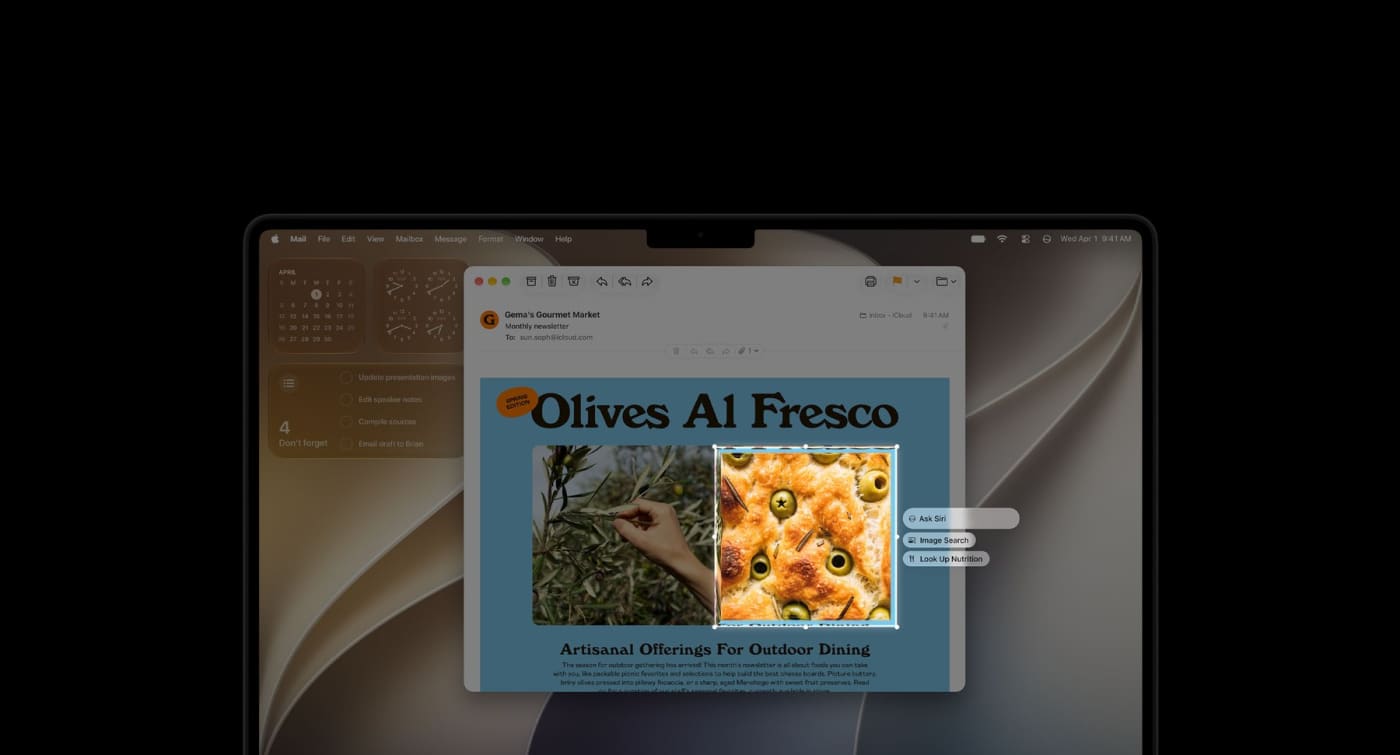
Visual Intelligence on Mac lets you ask about anything on your screen: take a screenshot of an image or PDF and have Siri answer, search or take action.
Siri also helps you write almost anywhere you type: drafting from scratch or giving feedback on what you have written. In Messages and Mail it matches your style, punctuation and tone. You can pick Siri's voice and adjust its expressiveness and pace.

Apple Intelligence in everyday apps
Safari automatically groups tabs by topic so related pages are easier to find, and Notify Me watches a page for changes — a price drop or a restock — and alerts you when it is time to act.

The Passwords app warns you about weak or compromised passwords and can update them for you.

Coming in a later software update: smarter photo editing (Spatial Reframing to recompose a shot after the fact, Extend to widen a photo, and a stronger Clean Up for removing larger objects), Image Playground for images in many styles including photorealistic, and Shortcuts you can create just by describing what you want.
Child safety on Mac
With Ask to Browse, kids must request permission for new websites, and parents can look at the request in Messages before approving. Communication Safety, which already guards against nudity, now also steps in before children see gore or violence in shared images and videos.

Time Allowances set total daily limits by category — entertainment, games, social media — with age-based guidance developed with clinical and child development experts, and parents can always adjust. Schedules choose which apps are available at which times or days. The parental controls in System Settings are redesigned so parents can see at a glance how their kids use the Mac.
Details that make it nicer to use
Liquid Glass is tuned for readability with more uniform refraction and better contrast. Toolbars are consistent, sidebars run edge to edge, window shapes and menu bar icons are updated, and a new slider lets you set the look from ultraclear to fully tinted.

Several things are faster: AirDrop transfers, browsing files over the network, and loading content on Safari's start page.

Mail search surfaces the most relevant results first with a new ranking system, even for messages buried deep in your inbox.

More small things worth knowing
Accessibility: VoiceOver understands onscreen content better with richer image descriptions, and a new captioning feature generates synced subtitles for any video and can translate existing captions Calendar: describe an event and it is added; edit the description from a lunch meeting to a coffee chat and the details adjust Ultrawide displays: higher resolutions such as 5K at 120Hz, and display arrangements are remembered every time you plug in iCloud Shared Albums: friends and family on Android or Windows can join and add photos more easily, with full-resolution sharing Suggestions in Messages and Mail: quick actions such as adding a calendar event or searching for a photo (English) Call Context: when you call a business, it surfaces relevant info such as a confirmation code from Mail when calling an airline Flyover in Maps: aerial imagery combined with Visual Intelligence models renders everything from architectural details to the shapes of individual trees Swipe down to refresh in apps like Safari, Mail, News, Podcasts and Calendar Video podcasts: switch smoothly between watching and listening
Which Macs can update
MacBook Neo (2026) MacBook Air with Apple silicon (2020 and later) MacBook Pro with Apple silicon (2020 and later) iMac with Apple silicon (2021 and later) Mac mini with Apple silicon (2020 and later) Mac Studio (2022 and later) Mac Pro with Apple silicon (2023)
Adapted from the macOS 27 Golden Gate page on apple.com